

Quick start
Three commands give you your own analytics backend in your Cloudflare account and a console to read it. No source checkout is needed.
npm install -g vizoalica
vizoalica env add prod    # deploys the backend to your Cloudflare account
vizoalica console         # opens the console at http://127.0.0.1:4318
How it fits together
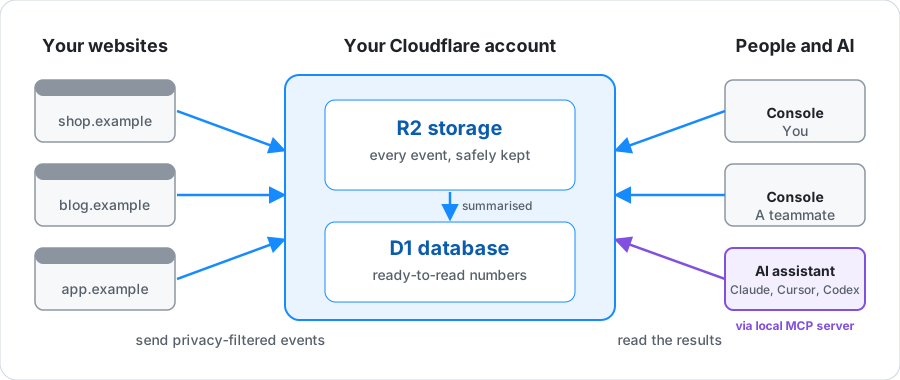
- Backend: a Worker, a D1 database, and an R2 bucket in your Cloudflare account. It receives, filters, and stores events.
- Console: a local web app on your computer, started on demand. Its browser never holds a remote credential.
- Websites: each site adds one script tag. Your backend serves the script and accepts events only from the site's own addresses.
- AI assistants (optional): Claude, Cursor, or Codex read your analytics through a local MCP server. See Ask your AI assistant.
Before you start
- Node.js 22 or newer, on macOS or Linux (on Windows, use WSL).
- A Cloudflare account with R2 enabled.
- A way to let Vizoalica use your Cloudflare account: either sign in in your browser (the default, nothing to create), or an API token with Workers Scripts: Edit, D1: Edit, Workers R2 Storage: Edit, and Account Settings: Read. The prompt links to Cloudflare's token form with those permissions filled in.
1. Install
npm install -g vizoalica2. Deploy your backend
vizoalica env add prodIt asks one question at a time and explains each. Say yes to deploying, then choose how to reach Cloudflare: 1 opens your browser to sign in, 2 takes a pasted token. The first run downloads Wrangler, which takes a minute. It creates a Worker, a D1 database, and an R2 bucket named prod-vizoalica-…, then checks that they work. Ctrl-C stops without changing anything.
There is no secret to copy. The admin key is saved for you in ~/.config/vizoalica/environments.json, readable only by you. A website with one script tag needs nothing else.
Run this step yourself
If you use an AI coding agent, run vizoalica env add in your own terminal, so your Cloudflare API token does not pass through an agent conversation.
3. Open the console
vizoalica consoleIt opens http://127.0.0.1:4318 in your browser. If something is not set up yet, a welcome page says what is wrong and which command fixes it.
4. Add your website
In the console, open Websites → Add website and enter the site's address. The website's Install page shows one script tag to paste into your pages. Publish your site, then choose Check now to confirm page views are arriving. Any host works, including GitHub Pages, Netlify, and WordPress. See the tour for screenshots.
5. Ask your AI assistant (optional)
vizoalica mcp install --client claude-code # or claude-desktop, codex, cursorThen ask, for example, “How did my websites do last week?”. The assistant reads your analytics through a local, read-only MCP server. See Ask your AI assistant.
More options
Connect to a backend that already exists
Say no to deploying in vizoalica env add, then give its backend address and the access key you were given. See Access keys.
Run more than one backend
Run vizoalica env add once per name, for example dev and prod. Each gets its own Worker, secrets, and access keys, named after it so they never collide in one Cloudflare account. A picker in the console switches between them. See Run more than one backend.
Script it without questions
export CLOUDFLARE_API_TOKEN=...
vizoalica env add prod --deploy --yes
vizoalica env add prod --connect --url https://prod.example.workers.dev --role admin --secret-stdin
Deploying is also a command of its own: vizoalica deploy prod shows the plan, and vizoalica deploy prod --apply creates it. See Create a backend.
Try it with sample data
From a source checkout (Node.js 22, Git, and Corepack), deploy a demo backend and send sample page views for a make-believe website:
git clone https://github.com/ehud-am/vizoalica.git && cd vizoalica
corepack enable && pnpm install
pnpm vizoalica deploy demo --apply && pnpm vizoalica demo --env demo
pnpm vizoalica console
pnpm vizoalica demo --env demo --remove deletes the sample.
Something not working?
Add --verbose to any command. It prints each step with timings and never a secret, so the output is safe to paste into an issue. See troubleshooting.
Next
- Add a website in detail, including signed tokens
- Create a backend, or the full backend guide from a source checkout
- Start the console day to day
- Access keys: give a teammate read-only or manage access
- Update with
npm update -g vizoalica, thenvizoalica deploy --update --allto bring every backend you administer to the same version; remove withnpm uninstall -g vizoalica. Runvizoalica helpfor every command.